Login Flows
Learn the differences between SP‑initiated and IdP‑initiated SSO.
The instructions in the Quick Start guide focus on setting up Service Provider (SP)-initiated SSO. In these scenarios, when a user attempts to login, they navigate to an application (a service provider) and are then redirected to the Identity Provider (IdP) for authentication, via the WorkOS API.
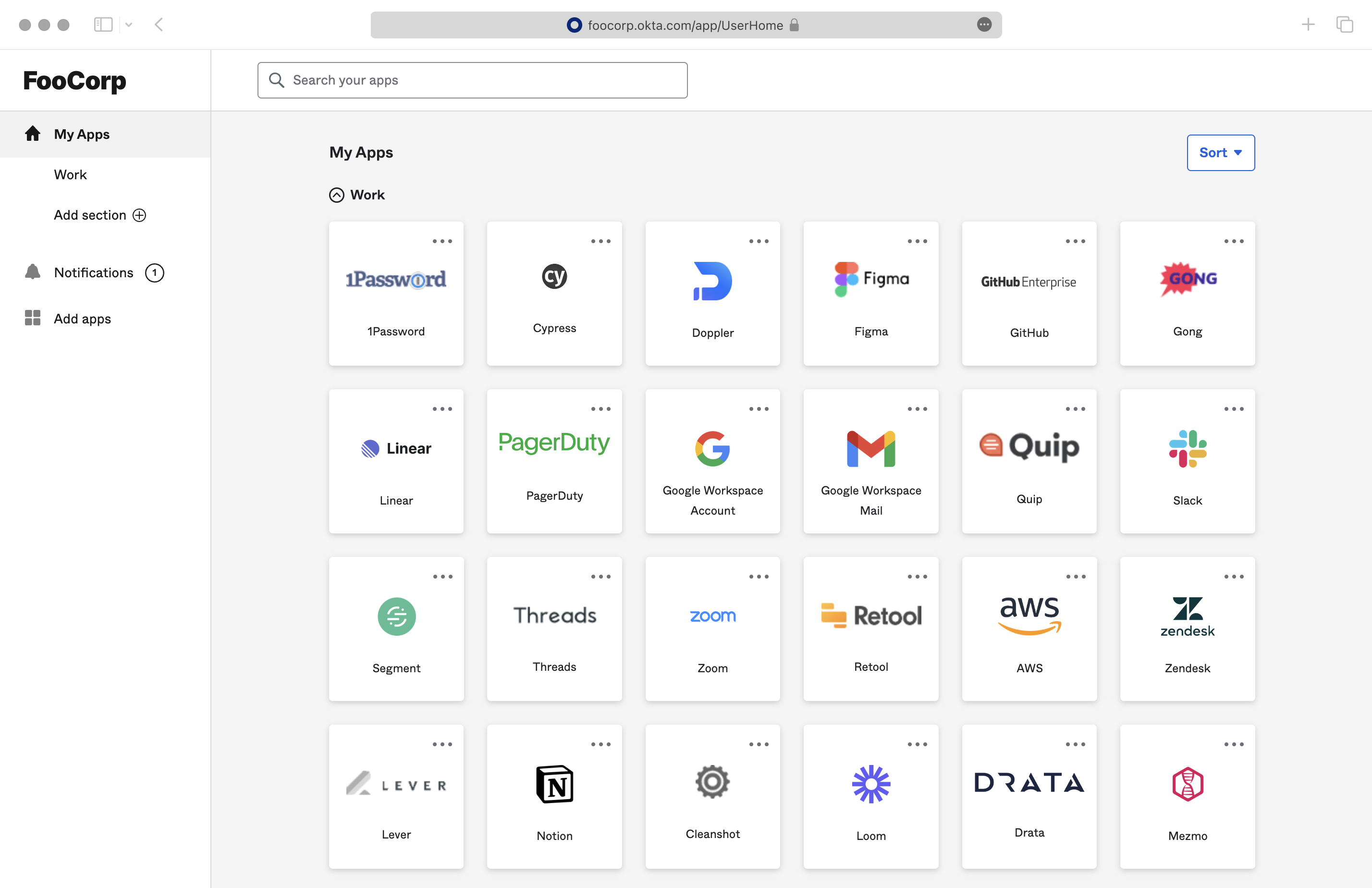
Alternatively, most users are able to start the process from the Identity Provider itself. Organizations will often provide an IdP dashboard where employees can select any of the eligible applications that they can access via the IdP, similar to the screenshot below. Clicking on a tile results in an IdP-initiated login flow, since the user initiates the login from the Identity Provider, not the application.
With an SP-initiated login flow, the user begins the authentication process from your application. You can control where the user will be redirected after login by specifying the redirectURI parameter when making the Get Authorization URL call. Additionally, this call can take an optional state parameter – this parameter will be returned in the callback after authentication, where your application can use it to verify the validity of the response or to pass any state from the originating session. One common practice is to route requests from different Organizations to a single Redirect URI, but instead utilize the state parameter to deep link users into the application after the authentication is completed.
IdP-initiated login redirects the user to the sign-in endpoint instead of sending an unsolicited SAML response to your callback endpoint. Your application starts a standard SP-initiated request from that endpoint, which mitigates the security risks of unsolicited SAML responses. This is generally transparent to the user, as they are already signed in to the identity provider.
Configure a sign-in endpoint for your application, in the Application section of the WorkOS Dashboard, under that application’s Redirects. A sign-in endpoint is a URL at your application that starts the authentication process, in the same way it does for a user who signs in from your application.
In your application, the sign-in endpoint just needs to call Get Authorization URL and redirect the user to the returned URL, exactly as it does for a user who starts sign-in from your application. WorkOS remembers the connection the IdP-initiated login came from, and uses it if your request doesn’t specify a connection selector.
| import type { NextApiRequest, NextApiResponse } from 'next'; | |
| import { WorkOS } from '@workos-inc/node'; | |
| const workos = new WorkOS(process.env.WORKOS_API_KEY); | |
| const clientId = process.env.WORKOS_CLIENT_ID; | |
| export default (_req: NextApiRequest, res: NextApiResponse) => { | |
| // A WorkOS Connection ID | |
| const connection = 'connection_123'; | |
| // The callback URI WorkOS should redirect to after the authentication | |
| const redirectUri = 'https://dashboard.my-app.com'; | |
| const authorizationUrl = workos.sso.getAuthorizationUrl({ | |
| connection, | |
| clientId, | |
| redirectUri, | |
| }); | |
| res.redirect(authorizationUrl); | |
| }; |
| import { NextRequest, NextResponse } from 'next/server'; | |
| import { WorkOS } from '@workos-inc/node'; | |
| const workos = new WorkOS(process.env.WORKOS_API_KEY); | |
| const clientId = process.env.WORKOS_CLIENT_ID; | |
| export function GET(_req: NextRequest, _res: NextResponse) { | |
| // A WorkOS Connection ID | |
| const connection = 'connection_123'; | |
| // The callback URI WorkOS should redirect to after the authentication | |
| const redirectUri = 'https://dashboard.my-app.com'; | |
| const authorizationUrl = workos.sso.getAuthorizationUrl({ | |
| connection, | |
| clientId, | |
| redirectUri, | |
| }); | |
| return NextResponse.redirect(authorizationUrl); | |
| } |
| const express = require('express'); | |
| const { WorkOS } = require('@workos-inc/node'); | |
| const app = express(); | |
| const workos = new WorkOS(process.env.WORKOS_API_KEY); | |
| const clientId = process.env.WORKOS_CLIENT_ID; | |
| app.get('/auth', (_req, res) => { | |
| // A WorkOS Connection ID | |
| const connection = 'connection_123'; | |
| // The callback URI WorkOS should redirect to after the authentication | |
| const redirectUri = 'https://dashboard.my-app.com'; | |
| const authorizationUrl = workos.sso.getAuthorizationUrl({ | |
| connection, | |
| clientId, | |
| redirectUri, | |
| }); | |
| res.redirect(authorizationUrl); | |
| }); |
| require "workos" | |
| WORKOS = WorkOS::Client.new( | |
| api_key: ENV["WORKOS_API_KEY"], | |
| client_id: ENV["WORKOS_CLIENT_ID"] | |
| ) | |
| def auth | |
| # A WorkOS Connection ID | |
| connection = "connection_123" | |
| # The callback URI WorkOS should redirect to after the authentication | |
| redirect_uri = "https://dashboard.my-app.com" | |
| authorization_url = WORKOS.sso.get_authorization_url( | |
| connection: connection, | |
| redirect_uri: redirect_uri | |
| ) | |
| redirect_to authorization_url | |
| end |
| require "sinatra" | |
| require "workos" | |
| workos = WorkOS::Client.new( | |
| api_key: ENV["WORKOS_API_KEY"], | |
| client_id: ENV["WORKOS_CLIENT_ID"] | |
| ) | |
| get "/auth" do | |
| # A WorkOS Connection ID | |
| connection_id = "connection_123" | |
| # The callback URI WorkOS should redirect to after the authentication | |
| redirect_uri = "https://dashboard.my-app.com" | |
| authorization_url = workos.sso.get_authorization_url( | |
| connection: connection_id, | |
| redirect_uri: redirect_uri | |
| ) | |
| redirect authorization_url | |
| end |
| from django import redirect | |
| from workos import WorkOSClient | |
| workos_client = WorkOSClient( | |
| api_key="sk_example_123456789", client_id="client_123456789" | |
| ) | |
| def auth(request): | |
| # A WorkOS Connection ID | |
| connection_id = "connection_123" | |
| # The callback URI WorkOS should redirect to after the authentication | |
| redirect_uri = "https://dashboard.my-app.com" | |
| authorization_url = workos_client.sso.get_authorization_url( | |
| connection_id=connection_id, redirect_uri=redirect_uri | |
| ) | |
| return redirect(authorization_url) |
| from flask import Flask, redirect | |
| from workos import WorkOSClient | |
| workos_client = WorkOSClient( | |
| api_key="sk_example_123456789", client_id="client_123456789" | |
| ) | |
| app = Flask(__name__) | |
| @app.route("/auth") | |
| def auth(): | |
| # A WorkOS Connection ID | |
| connection_id = "connection_123" | |
| # The callback URI WorkOS should redirect to after the authentication | |
| redirect_uri = "https://dashboard.my-app.com" | |
| authorization_url = workos_client.sso.get_authorization_url( | |
| connection_id=connection_id, redirect_uri=redirect_uri | |
| ) | |
| return redirect(authorization_url) |
To override the sign-in endpoint redirect, configure a RelayState in the IdP as URL parameters. Two parameters are supported:
-
client_idroutes the user to a specific application, and therefore to that application’s sign-in endpoint -
redirect_urisends the user to an alternate Redirect URI from those configured in the Applications section of the WorkOS Dashboard. Open your application and go to the Redirects tab to manage these URIs.
Any other values in the RelayState are ignored.
Your application will also be able to retrieve the Profile object for the user upon successful authentication. If your IdP is unable to provide a redirect_uri in its default RelayState, or if you would like to generate a custom redirect URI for each user after they sign in, you can use the Profile object to dynamically generate a redirect URI.
The Profile object includes the connection_id which identifies the connection that the profile is associated with in WorkOS. We recommend using the connection information for routing requests in an IdP-Initiated flow.
This document offers guidance to integrate Single Sign-On with our standalone API into your existing auth stack. You might also want to look at AuthKit, a complete authentication platform that leverages Single Sign-On functionality out of the box, following best practices.